
:)Get Started Krungsri API portal
How to get started with Krungsri API portal...
How to...
Lorem Ipsum is simply dummy text of the printing and typesetting industry. Lorem Ipsum has been the industry's standard dummy text ever since the 1500s, when an unknown printer took a galley of type and scrambled it to make a type specimen book.
:)Play in our Sandbox
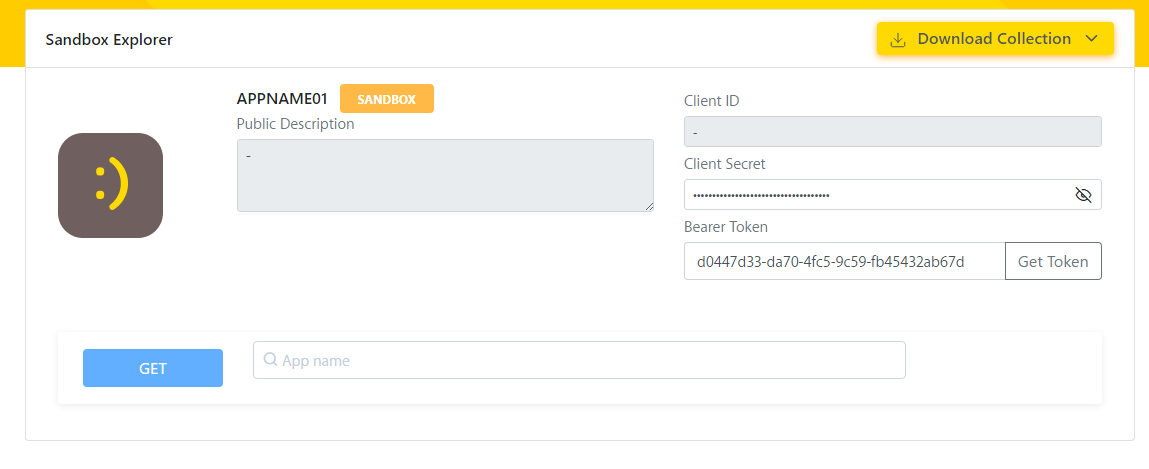
If you are passing by or non-technical guy you can easily obtain how our APIs work by craftly create GUI on our API explorer.
Step to do:
- Go to Sandbox Explorer Page
- Click button Get Token. It will automatically call authentication API and get Bearer Token for you.
- Select API to play.
- Input parameter.
- Click Submit to call API.
:)Call our APIs
If you has experience and want to feel real life API call so please use HTTP Client that you like (ex. Postman, SOAPUI, HTTPBOT, etc) to play with sandbox.
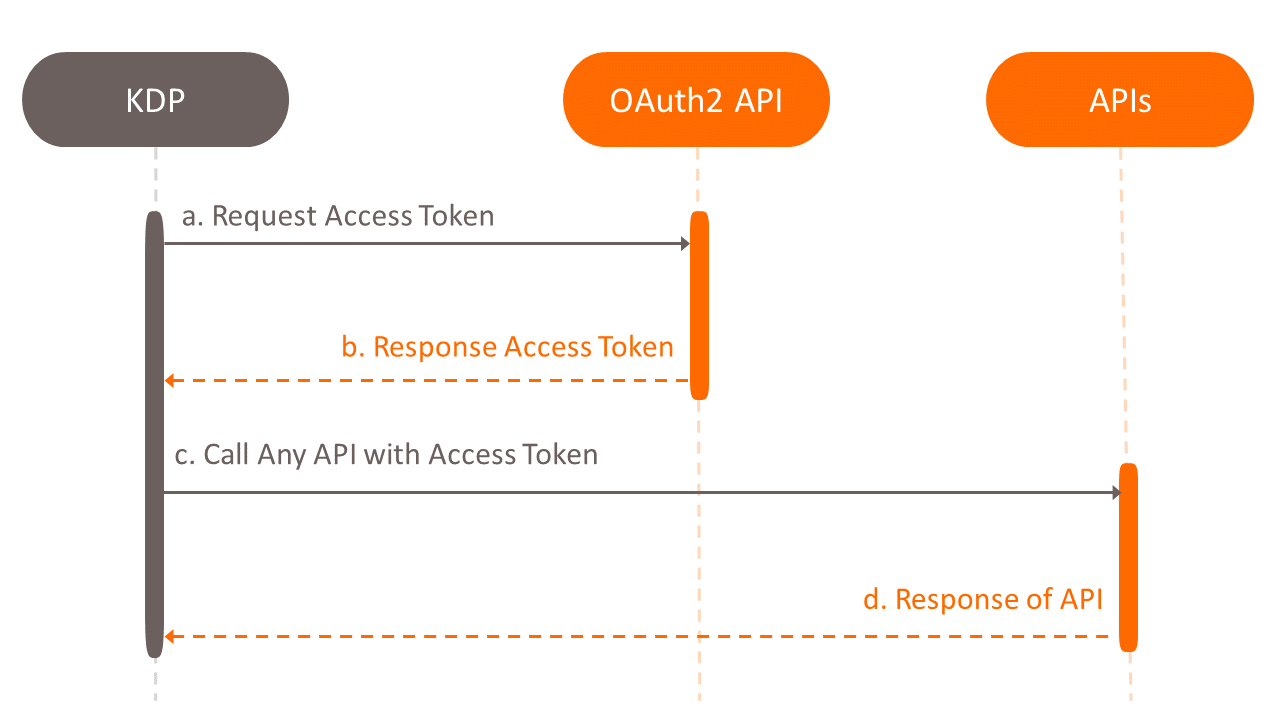
To be more precise please embrace our nicely create authentication method below.
For Server-to-Server we use OAuth2 Client Credentials to secures these APIs. All APIs specification provided on the Developer Portal are swagger 2.0 based. The swagger file describes all information required to make a valid request and all the needed authentication in the securityDefinitions section. The swagger file can be downloaded from the Developer Portal.
What is Message Digest and Signature?
Following API international best practices, message digest and signature brings additional security on top of the standard network
encryption for highly sensitive API calls. In the (unlikely) case the network layer security is compromised, this additional security
layer adds complexity of a hacker to alter the message request and its associated signature.
encryption for highly sensitive API calls. In the (unlikely) case the network layer security is compromised, this additional security
layer adds complexity of a hacker to alter the message request and its associated signature.
Digest
Digest is RFC 3230 standard, designed to validate message integrity.
Client must calculate hash value of request body and encode in base64 encoding with SHA-256 of then put in header name “Digest”
Client must calculate hash value of request body and encode in base64 encoding with SHA-256 of then put in header name “Digest”
Sample HTTP Request
       POST /foo?param=value&pet=dog HTTP/1.1
       Host: krungsri.com
       Date: Sun, 05 Jan 2014 21:31:40 GMT
       Content-Type: application/json
       Content-Length: 18

       {"hello": "world"}
This is because Base64 encoding of SHA-256 of {"hello": "world"} is X48E9qOokqqrvdts8nOJRJN3OWDUoyWxBf7kbu9DBPE=
You can set that digest header is
Digest: SHA-256=X48E9qOokqqrvdts8nOJRJN3OWDUoyWxBf7kbu9DBPE=
Sample HTTP Request with Digest
       POST /foo?param=value&pet=dog HTTP/1.1
       Host: krungsri.com
       Date: Sun, 05 Jan 2014 21:31:40 GMT
       Content-Type: application/json
       Content-Length: 18
       Digest: SHA-256=X48E9qOokqqrvdts8nOJRJN3OWDUoyWxBf7kbu9DBPE=


       {"hello": "world"}
List of Signature Field
| Field name | Mandatory/Optional | Description | Sample Value |
|---|---|---|---|
| keyId | M | This value will indicate which key (and algorithm) to be use. | client-secret |
| algorithm | O | The algorithm to be use, as per latest specification we will support only 1 algorithm which is hs2019 | hs2019 |
| created | M | Unix timestamp of create date/time of this header | 1402170695 |
| expires | O | Unix timestamp of expire date of this request | 1402170995 |
| headers | M | List of header to be use in hash calculation , It provide in space separated value.
All header provided in here must be in lower case Signature specification provide 3 special header name to be use in hash calculation
Sample value date (request-target) digest This mean that we will compute hash from 3 header in following order
|
date (request-target) digest |
| signature | M | The parameter is a base 64 encoded Headers signature. The string input for digital signature calculation will explain in next section due to its complexity | WDNZzm22RFQs1uZUXmgVDgjDz379GzBbG939DJNP+8A= |
Headers signature
Keyed-Hashing for Message Authentication Code (HMAC) using SHA-256 is used to create a hashed signatures with "Signature Key" and "Header combining String". The symmetric key is the "Signature Key" registered in the Developer Portal, as part of the Application detailed information. "Header combining String" will be combining all header and value of that header into single string in following format
Result string = "${headerLine1}\n${headerLine2}\n${headerLine3}......"
where
\n is newline charactor
${headerLine1} is header line 1
${headerLine2} is header line 2
${headerLine3} is header line 3
......
where
\n is newline charactor
${headerLine1} is header line 1
${headerLine2} is header line 2
${headerLine3} is header line 3
......
Headers line generation
header line = ${headerName}: ${trimmedHeaderValue}
header line = ${headerName}: ${trimmedHeaderValue}
where
${headerName} is header name
${trimmedHeaderValue} is trimmed(removing leading and trailing whitespace) header value
Each header line will be concatenate by \n (new line).
${headerName} is header name
${trimmedHeaderValue} is trimmed(removing leading and trailing whitespace) header value
Each header line will be concatenate by \n (new line).
The list of header and order to be concatenate is provided in signature’s header field
The digital signature will calculate using bellow pseudo code
Headers Signature = doHmacSha256Base64 (UTF8-byte-array
(“Header1:Value1\nHeader2:Value2\n…\nHeadern:Valuen”), “Signature Key” )
The digital signature will calculate using bellow pseudo code
Headers Signature = doHmacSha256Base64 (UTF8-byte-array
(“Header1:Value1\nHeader2:Value2\n…\nHeadern:Valuen”), “Signature Key” )
Example digital signature
Algorithm is HMAC with signature key = don't tell
Algorithm is HMAC with signature key = don't tell
Headers Signature = doHmacSha256Base64 ( UTF8-byte-array(digest: SHA- 256=X48E9qOokqqrvdts8nOJRJN3OWDUoyWxBf7kbu9DBPE=\ndate: Tue, 07 Jun 2014 20:51:35 GMT\n(request-target): post /foo/Bar" ), "don't tell")
This will result in following headers signature
eMhtXlHAsQe6JQ+vcRgQ1OuttDPYRumXcfJRo+fY7+Y=
This will result in following headers signature
eMhtXlHAsQe6JQ+vcRgQ1OuttDPYRumXcfJRo+fY7+Y=
Sample HTTP Request with Digest and Signature
      POST /foo/Bar HTTP/1.1
      Host: example.com
      Date: Tue, 07 Jun 2014 20:51:35 GMT
      Content-Type: application/json
      Content-Length: 18
      Digest: SHA-256=X48E9qOokqqrvdts8nOJRJN3OWDUoyWxBf7kbu9DBPE=
      Signature: keyId="client-secret",algorithm="hs2019",created=1402170695,expires=1402170995,headers="digest date (request-target)",signature="eMhtXlHAsQe6JQ+vcRgQ1OuttDPYRumXcfJRo+fY7+Y="

      {"hello": "world"}


:)How to Become Partner
We are ready to help you reach your goals as a financial technology partnership to keep your business moving faster. In order to integrate with our production APIs, submit your idea through Contact Us menu. Then our sales will check out your business needs to determine if we will be a good fit, you'll agreed with Krungsri's Terms and Conditions then sign the MOU.
- Our technical team will support on the integration.
- API Testing will be performed and validated base on your use cases.
- Once we are good on the testing then integrate to production APIs
- Go live